Focus Mode: Stopping Shoulder-Surfing on Shared PDFs
Most document security is designed for a threat that happens before or after the viewing — someone without the password, or someone who screenshots the page and forwards it. There's a third moment that almost nothing protects: the actual few minutes someone is reading your document, on a laptop, in a co-working space, on a train, in an open-plan office, with anyone able to glance at the screen and read exactly what's on it.
A password doesn't help here — the person reading the term sheet already has legitimate access. A watermark doesn't help either — it identifies who leaked a copy after the fact, but it does nothing to stop a stranger two seats over from reading your cap table right now. That gap is what Focus Mode is for.
What Focus Mode Does
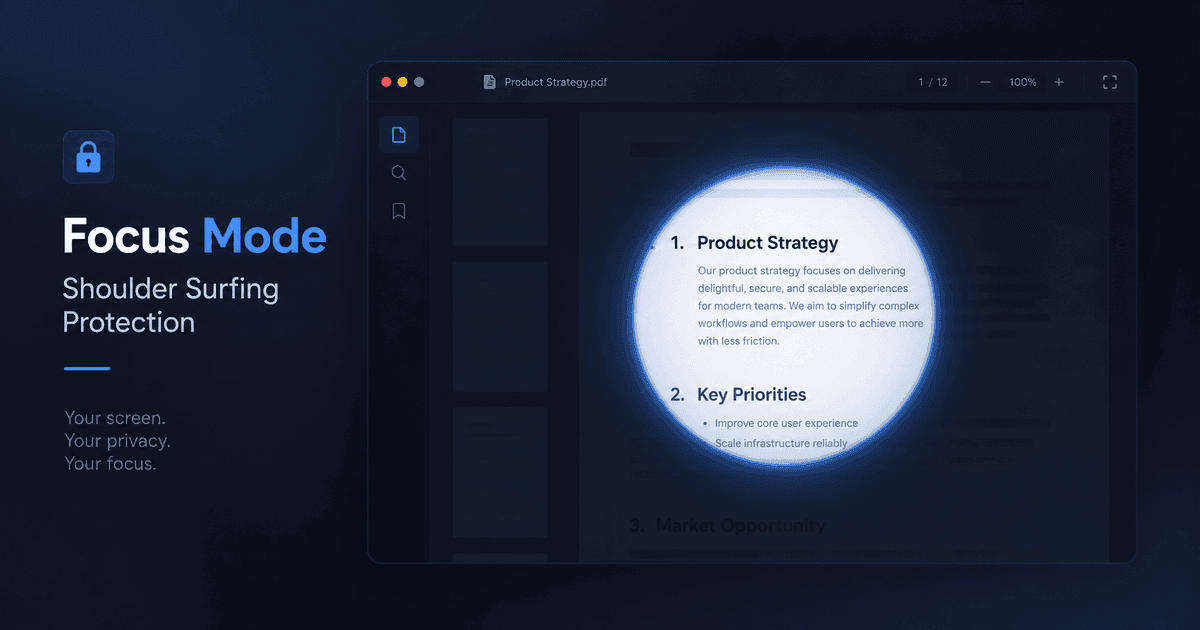
Turn it on for a share link, and the viewer's page loads fully hidden — a blank, opaque page. As they move their mouse, a small circle around the cursor reveals the sharp content underneath. Move away, and it covers back up. On a phone or tablet, a finger drag does the same thing.
The effect is exactly what it sounds like: a flashlight moving over a document in a dark room. At any given instant, only a small, deliberate area is legible. Someone glancing at the screen from across a table, or over a shoulder, sees a mostly-blank page with a small patch of text — not a full page they can casually read in the second it takes to look over.
Focus Mode is a per-link toggle, same as password protection or a watermark. It doesn't touch the underlying PDF file — turn it off and the document displays normally, same as before.
Why Existing Controls Don't Cover This
It's worth being specific about why this needed to be its own feature rather than something password protection or watermarking already handled:
| Control | Protects Against | Doesn't Protect Against |
|---|---|---|
| Password | Someone without the credential opening the link at all | Anyone who can see the legitimate viewer's screen |
| Watermark | Anonymous leaks — traces a copy back to a viewer | The original viewing moment itself; watermarks only matter after a leak already happened |
| Focus Mode | A bystander reading the full page over someone's shoulder or on a shared screen | A determined viewer patiently screenshotting their way across the whole page |
That last row matters. Focus Mode is deliberately framed as a deterrent, not a lock. Someone motivated enough could take several overlapping screenshots as they move the cursor and eventually reassemble most of a page. What Focus Mode actually removes is the casual read — the glance, the single photo, the person walking past a desk. It raises the cost of a leak from "look at the screen" to "commit to a multi-step reconstruction," and most opportunistic leaks don't survive that.
A Detail That Matters: It Scales With Zoom
The first version of this we shipped had an obvious hole: the reveal circle was a fixed size on screen, so zooming the document out to fit more of it on screen also made the circle cover proportionally more of the page. Someone could just zoom out to 50% and get most of the document in one hover.
We fixed that — the spotlight radius now scales with the zoom level, so the proportion of the page revealed stays constant whether someone is zoomed in or out. Worth mentioning here mainly because it's the kind of gap that's easy to miss if you only test a feature like this at 100% zoom.
We also closed a second gap in the same pass: PdfWarden's page navigator shows a thumbnail strip of every page for quick jumping, and thumbnails were rendering at full clarity regardless of Focus Mode. That's now blurred whenever Focus Mode is on, so the navigator stays useful without becoming a way to preview every page in miniature.
Where It's Actually Worth Turning On
Focus Mode isn't something every link needs — most documents don't have a realistic shoulder-surfing risk. It earns its place on the small category of documents where the viewing moment itself is the exposure:
- A cap table or financial model reviewed on a laptop in a shared workspace
- A term sheet or contract read on a train, in an airport lounge, or any public seat
- A confidential deck presented on a shared screen where the audience includes people who shouldn't see every slide at once
- Any recurring share where the same sensitive document gets opened repeatedly in unpredictable physical settings
Don't reach for Focus Mode as a substitute for access control. If the actual risk is the wrong person opening the link at all, that's a password problem, not a viewing-friction problem. Focus Mode assumes the viewer is already authorized — it protects the moment of reading, not the gate before it.
Stacking It With the Rest
Focus Mode is most effective as one layer, not the whole strategy. The combination we'd actually recommend for something like a due-diligence document: a password to keep out anyone uninvited, a dynamic watermark so a leak still traces back to a viewer, and Focus Mode so the reading moment itself isn't an open window for anyone nearby. This is the same layered logic we've written about before — no single control does everything, and the sensitive documents are the ones worth stacking more than one on.
Conclusion
Passwords decide who gets in. Watermarks decide what happens if a copy gets out. Neither one has anything to say about the several minutes in between, when a legitimate, authorized viewer is just... reading, somewhere a stranger can see their screen. Focus Mode is built specifically for that gap — not a replacement for access control, but the piece that was missing from it.
Protect the reading moment, not just the gate. Focus Mode is available on Pro and Business plans alongside password protection and dynamic watermarking. Start free and turn it on for the next document you don't want read over someone's shoulder.
Share this article
Ready to share documents securely?
Upload your first PDF, create a secure share link with custom access rules, and track every view in real-time.
Start Sharing Securely